
If you have whatsapp on huawei devices, you will recognize that there are times when you encounter errors during your login. There are many reasons behind this occurrence. This article will explain to you some of the main causes of why WhatsApp login fails on your Huawei device. You have to keep in mind, though, that there are many other reasons why this happens, so you still have to troubleshoot and find the true source of this kind of bug. Here are four of the factors that cause your logins to fail on your WhatsApp account.
Reasons Why WhatsApp Login Fails
Network disconnection
If the login fails with whatsapp on huawei phone or tablet, one of the most likely causes is network disconnection. This should be the first thing that you should monitor when you are not able to access your WhatsApp account. You can do this by checking your Wi-Fi connection. You may also look at the network signal of your device to see if your data is still working. To resolve this issue, you can restart your router as well as your smartphone. Restarting WhatsApp can also work.
System issues
When system issues are mentioned, you can automatically move your eyes to the app itself. You may have encountered corrupted data, which makes login impossible. This may be because of errors in the WhatsApp system due to cache issues. You can go to WhatsApp Settings and clear the cache to remove these corrupted files. You should also restart your phone for good measure. You should also look at some of the other apps that you may have newly installed that are affecting the functionality of WhatsApp. If it is possible, you can delete apps that are causing your WhatsApp to crash.
Non-updates
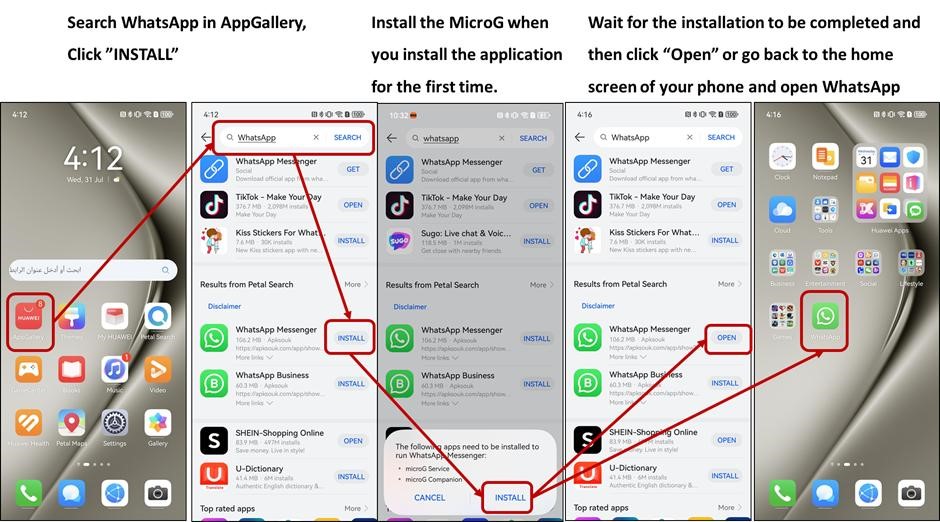
Not being able to update WhatsApp may also prevent you from logging into your account. WhatsApp developers make sure that the performance of this app will be at its peak from day to night. People from all over the world are utilizing this app to increase productivity and convenience. If you are not habitually updating WhatsApp, you are possibly missing out on bug fixes that may be causing login issues. To solve this problem, you should regularly update WhatsApp by going to AppGallery and making sure that you have the latest version of the app.
Account issues
You may be experiencing login failures because of account issues. Since you are using an app that is available to the public, you must observe strict compliance with the rules and regulations set by its team of developers. A violation of these guidelines may result in the temporary or permanent banning of your account. You may want to try logging in a few times before assuming that you have breached is bylaws. If you suspect that you have WhatsApp issues, you may have to contact customer support for a review of your account.
Conclusion
When you face problems with your WhatsApp login, you have to keep calm and do not panic. All problems have a solution, especially when talking about WhatsApp. It is one of the most robust messenger apps available because of the numerous updates and bug fixes that are implemented on it. Thus, whatsapp on huawei will not give you too much of a problem with logging in. However, it does happen sometimes, so you have to be ready. This may be caused by network disconnection, system or app issues, or no automatic updates of the app. You need to resolve these issues one by one so that you can continue utilizing the features of WhatsApp on your Huawei device.

 By
By